Canva is a fantastic and extremely beginner-friendly online design tool.
It isn’t without it’s issues though, and a common problem for some users is being able to find the right graphics and elements (as well as sets of elements) for their designs from the hundreds of thousands graphic elements available on the platform.
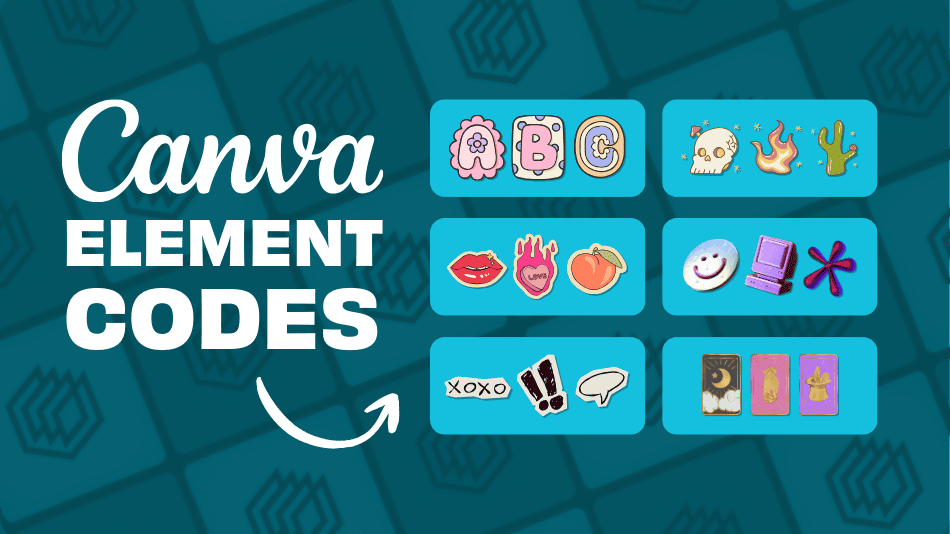
To help you with this, we’ve put together this guide to not only show you the best ways to find Canva elements but we’ve also curated over 200 graphic element sets to inspire you.
Let’s get into it.
Element codes by niche:
Canva element tips:
- Getting started with Canva elements
- How to find the right Canva elements
- Bonus tip: Save your elements
Access 600+ Canva Element Sets (For Free)
If you want access to our full (and meticulously curated) Canva element sets template with over 600 sets, we’ve created a file of Canva templates that contain all of them.
Put your email address into the form below and we’ll send it to your inbox straight away:
Make sure to check your junk/spam inbox in case it gets sent to there.
Canva Aesthetic Element Codes
Below are some attractive and aesthetic Canva element sets. We’ve included the element sets below and another 16 of these aesthetic sets in our full Canva template – so make sure to get it (for free) by clicking here and filling in the form:

Canva Aesthetic Elements:
- set:nAFCPLIaqCI (Groovy backgrounds)
- set:nAFGrb30Nsw (Aesthetic UI windows)
- set:nAGiFPDIP-M (Aesthetic quote boxes)
- set:nAFs7rEiWpI (Cartoon letters)
- set:nAFK4V7s1Nw (Aesthetic shapes)
- set:nAF6f5M0nOs (Polaroid photo frames)
- set:nAGhCu1nf6A (Infographic elements)
- set:nAFWgMNuNhY (90’s style illustrated elements)
- set:nAFsJ-v_aSE (Splash shapes)
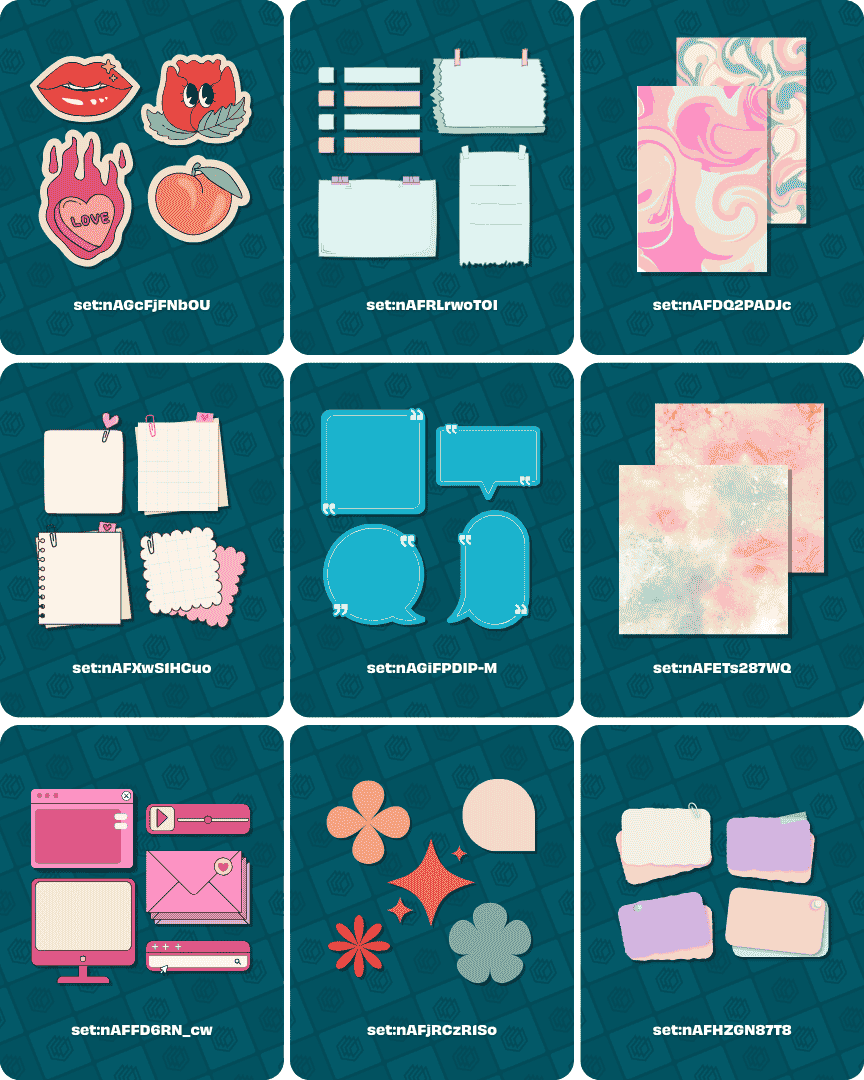
Canva Aesthetic Elements:
- set:nAGcFjFNbOU (Aesthetic stickers)
- set:nAFRLrwoTOI (Notepad and stationery elements)
- set:nAFDQ2PADJc (Abstract backgrounds)
- set:nAFXwS1HCuo (Aesthetic sticky notes)
- set:nAGiFPDIP-M (Quote boxes)
- set:nAFETs287WQ (Splash ink backgrounds)
- set:nAFFD6RN_cw (UI windows)
- set:nAFjRCzR1So (Aesthetic shapes)
- set:nAFHZGN87T8 (Pastel sticky notes)
Canva Beauty Element Codes
Below are some beauty Canva element sets. We’ve included the element sets below and another 18 similar sets in our full Canva template – so make sure to get it (for free) by clicking here and filling in the form:
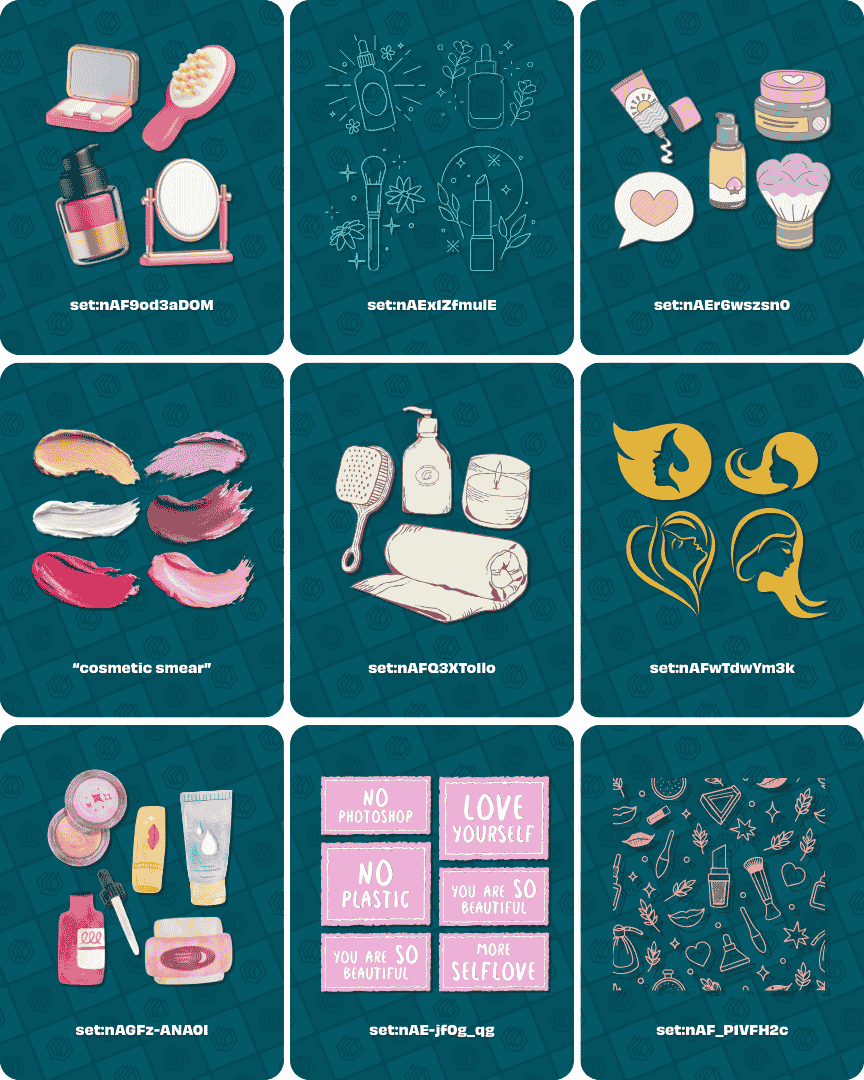
Canva Beauty Elements:
- set:nAF9od3aDOM (3D beauty items)
- set:nAEx1ZfmulE (Monoline beauty elements)
- set:nAEr6wszsn0 (Doodle style cosmetics)
- “cosmetic smear” (Cosmetic smear elements)
- set:nAFQ3XToIlo (Hand-drawn beauty elements)
- set:nAFwTdwYm3k (Beauty logo elements)
- set:nAGFz-ANA0I (Watercolour skincare elements)
- set:nAE-jf0g_qg (Beauty stickers)
- set:nAF_P1VFH2c (Cosmetics backgrounds)
Canva Boho Element Codes
Below are some boho Canva element sets. We’ve included the element sets below and another 16 similar sets in our full Canva template – so make sure to get it (for free) by clicking here and filling in the form:
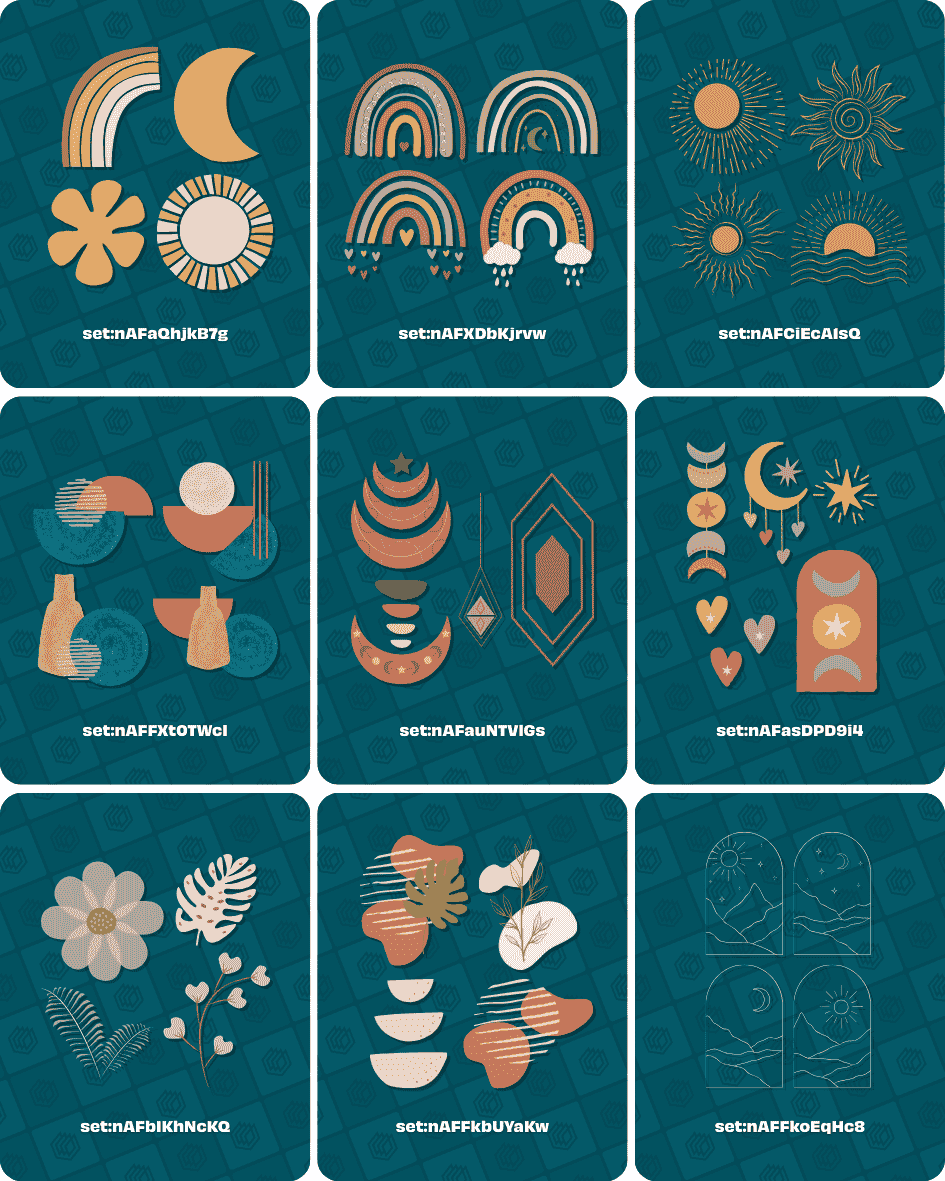
Canva Boho Elements:
- set:nAFaQhjkB7g (Boho shape illustrations)
- set:nAFXDbKjrvw (Boho rainbows)
- set:nAFCiEcA1sQ (Boho suns)
- set:nAFFXt0TWcI (Watercolour boho shapes)
- set:nAFauNTVlGs (Boho moon elements)
- set:nAFasDPD9i4 (Illustrated boho elements)
- set:nAFbIKhNcKQ (Boho plant elements)
- set:nAFFkbUYaKw (Aesthetic boho elements)
- set:nAFFkoEqHc8 (Monoline boho landscape elements)
Canva Christmas Element Codes
Below are some Christmas Canva element sets. We’ve included the element sets below and another 24 similar sets in our full Canva template – so make sure to get it (for free) by clicking here and filling in the form.
Tip: Want even more Canva Christmas elements? Check out our Canva Christmas element codes resource.
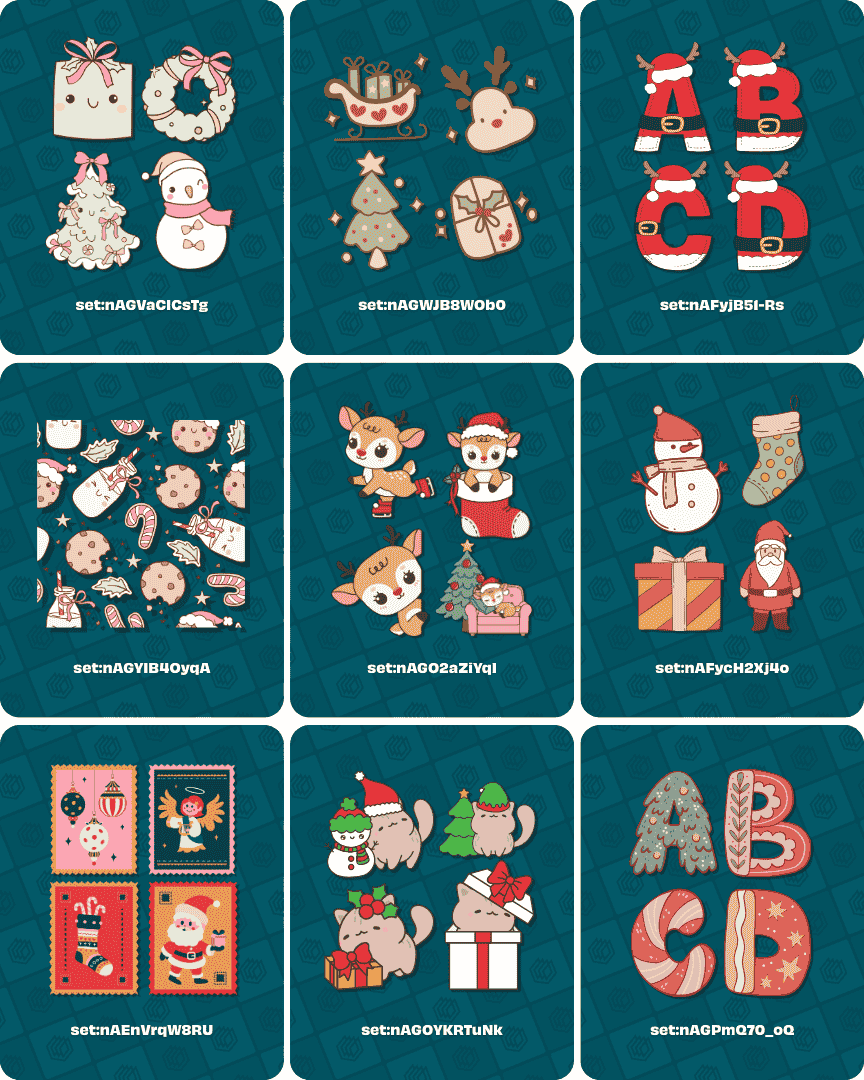
Canva Christmas Elements:
- set:nAGVaCICsTg (Cute Christmas illustrations)
- set:nAGWJB8WOb0 (Cute Christmas elements)
- set:nAFyjB51-Rs (Santa Claus letters)
- set:nAGYIB4OyqA (Christmas backgrounds)
- set:nAGO2aZiYqI (Cute reindeer elements)
- set:nAFycH2Xj4o (Hand-drawn Christmas elements)
- set:nAEnVrqW8RU (Christmas stamps)
- set:nAGOYKRTuNk (Kawaii Christmas cat elements)
- set:nAGPmQ70_oQ (Christmas alphabet elements)
Canva Cosmic & Space Element Codes
Below are some cosmic and space Canva element sets. We’ve included the element sets below and another 14 similar sets in our full Canva template – so make sure to get it (for free) by clicking here and filling in the form:

Canva Cosmic & Space Elements:
- set:nAFPWWLPTe0 (Gradient space elements)
- set:nAFORSd9u7Y (Watercolour space elements)
- set:nAFLgouKPmM (Blurry space elements)
- set:nAFDkcuAjUQ (Cute space elements)
- set:nAFKNMohr64 (Cosmic backgrounds)
- set:nAFO-waLin8 (Doodle space elements)
- set:nAFltB9fXZM (Planet elements)
- “pixelated galaxy” (Pixelated space elements)
- set:nAFC4yKdnCc (Watercolour space elements)

Canva Cosmic & Space Elements:
- set:nAFk3CfYmNk (Celestial elements)
- set:nAF-Q-7p-FM (Space elements)
- set:nAFZez_V_XQ (Doodle star elements)
- set:nAEU-HvQnkE (Gradient space elements)
- “3D space” (3D space elements)
- set:nAEUaItAXzU (Clean lined space elements)
- set:nAFry_Fx3sY (Cartoon illustration space elements)
- set:nAFTe535zRE (Textured space elements)
- “space letter” (Space letter elements)
Canva Cute & Fun Element Codes
Below are some cute and fun Canva element sets. We’ve included the element sets below and another 26 similar sets in our full Canva template – so make sure to get it (for free) by clicking here and filling in the form:

Canva Cute & Fun Elements:
- set:nAFKG2xdBa4 (Cute cartoon shapes and elements)
- set:nAEnV709cfo (Cute hand-drawn elements)
- set:nAF0RR_67UM (3D bubble alphabet)
- set:nAGWqPpVpe0 (Cute doodle elements)
- set:nAFRU7FZhzw (3D enamel elements)
- set:nAE4SiKTy0Q (Cute backgrounds)
- set:nAFmeks7jkM (Gradient letters)
- set:nAEvl2T0Br4 (Kawaii book and library elements)
- set:nAE4SpEcPaM (Deco stickers)
Canva Easter Element Codes
Below are some Easter Canva element sets. We’ve included the element sets below and another 15 similar sets in our full Canva template – so make sure to get it (for free) by clicking here and filling in the form:

Canva Easter Elements:
- set:nAF_TrLrEyc (Easter bunny elements)
- “@chonnieartwork easter alphabet” (Easter alphabet)
- set:nAGbTyIhEe0 (Easter illustrations)
- set:nAGlvyOPMw0 (Easter backgrounds)
- set:nAGf414wLlE (Cute easter elements)
- set:nAF9l9AplOU (Easter stickers)
- set:nAFcnXaSz9c (Cute Easter characters)
- set:nAFZwwpesDE (Easter bunny letters)
- set:nAF3a2FOQpk (Cute Easter elements)
Canva Flowers Element Codes
Below are some flower Canva element sets. We’ve included the element sets below and another 41 similar sets in our full Canva template – so make sure to get it (for free) by clicking here and filling in the form:
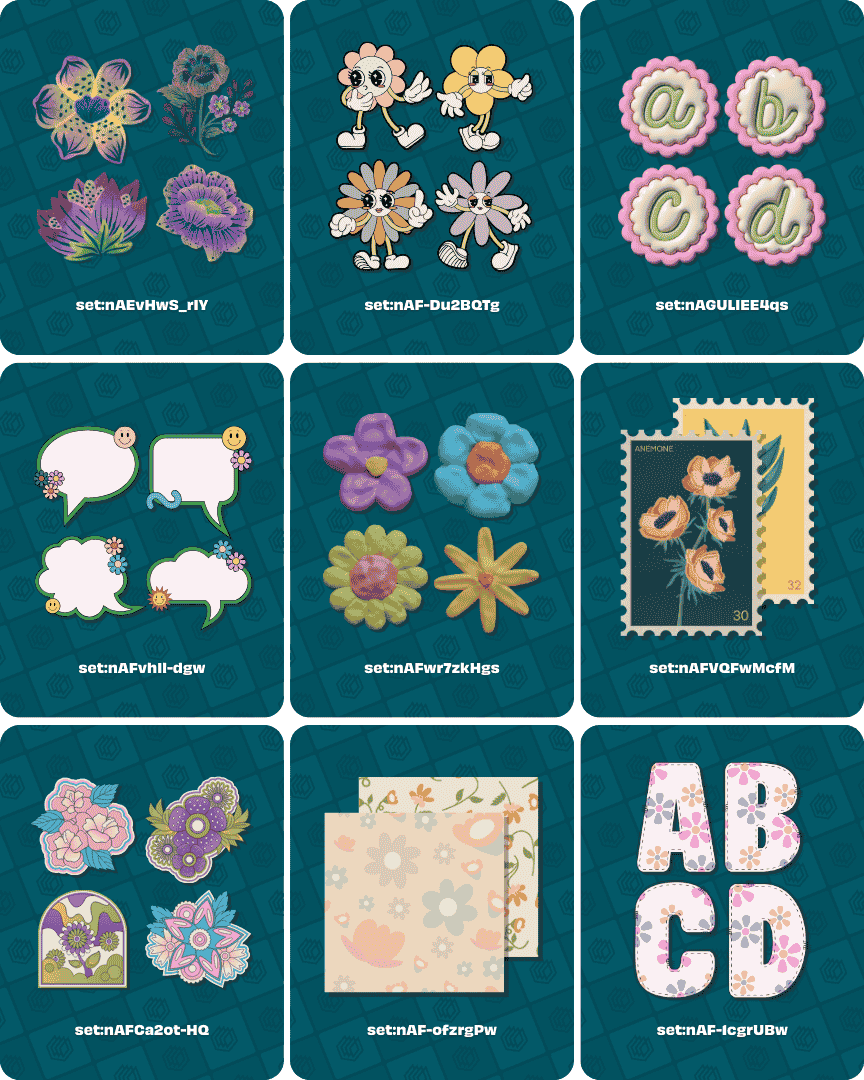
Canva Flower Elements:
- set:nAEvHwS_rIY (Watercolour flower elements)
- set:nAF-Du2BQTg (Groovy flower elements)
- set:nAGULIEE4qs (Floral alphabet)
- set:nAFvhIl-dgw (Flower speech bubbles)
- set:nAFwr7zkHgs (3D flower elements)
- set:nAFVQFwMcfM (Flower stamps)
- set:nAFCa2ot-HQ (Psychedelic flower elements)
- set:nAF-ofzrgPw (Flower backgrounds)
- set:nAF8fT3XVeM (Daisy flower elements)
Canva Frame Element Codes
Below are some of the best frame elements I could find on Canva. I’ve included the frame element sets below and an additional 18 frame element sets in our full template – so make sure to get it (for free) by clicking here and filling in the form.
You can also access the file that only contains the frame elements by clicking here.
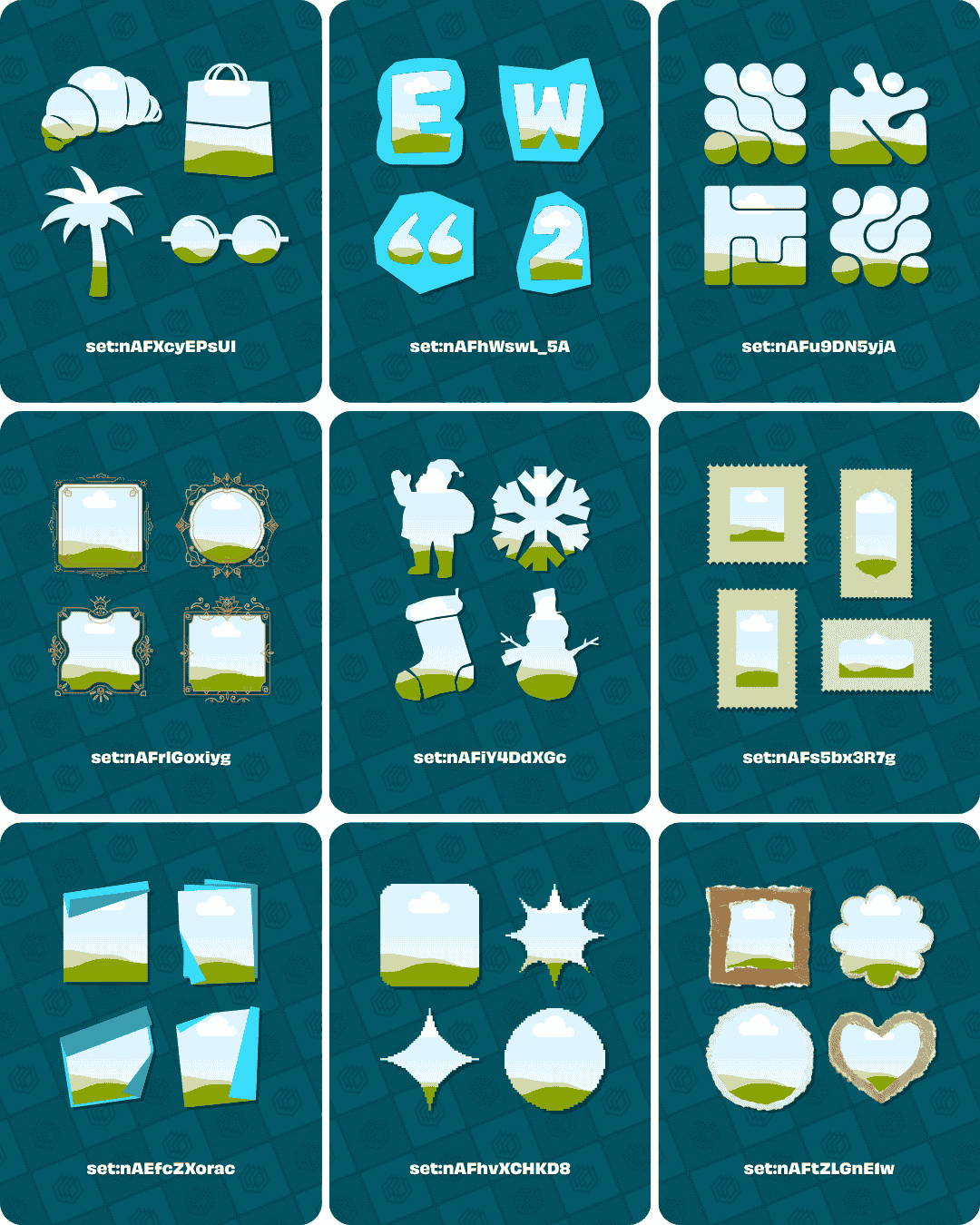
Canva frame elements:
- set:nAFXcyEPsUI (Silhouette frames)
- set:nAFhWswL_5A (Scrapbook letter and number frames)
- set:nAFu9DN5yjA (Abstract cutout frames)
- set:nAFrlGoxiyg (Diwali monoline frames)
- set:nAFiY4DdXGc (Christmas frames)
- set:nAFs5bx3R7g (Diwali postage stamp frames)
- set:nAEfcZXorac (Folded paper frames)
- set:nAFhvXCHKD8 (Pixel frames)
- set:nAFtZLGnE1w (Ripped paper frames)
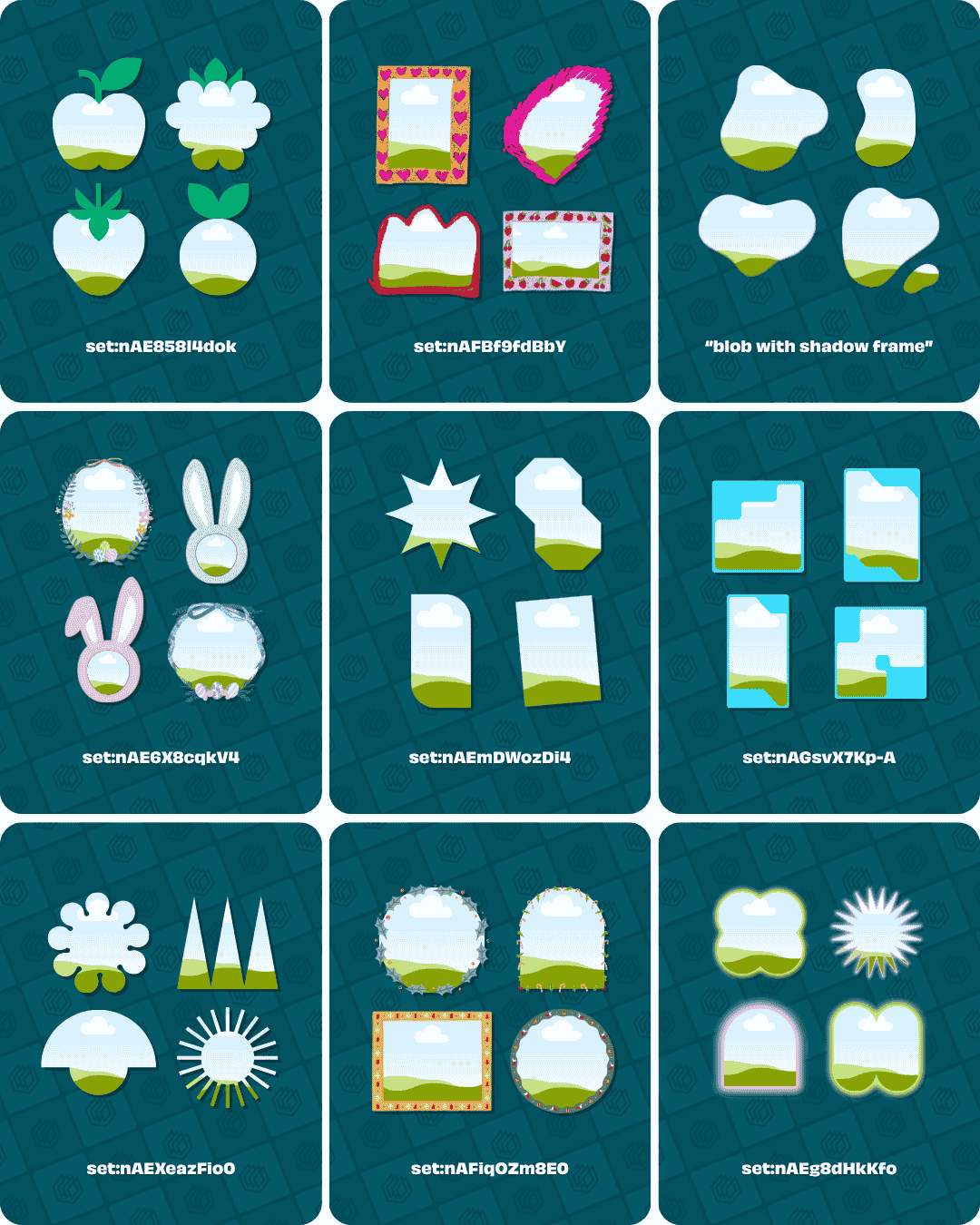
Canva frame elements:
- set:nAE858l4dok (Geometric fruit frames)
- set:nAFBf9fdBbY (Textured and abstract frames)
- “blob with shadow frame” (Blog with shadow frames)
- set:nAE6X8cqkV4 (Easter frames)
- set:nAEmDWozDi4 (Simple and abstract frames)
- set:nAGsvX7Kp-A (Cutout shape frames)
- set:nAEXeazFio0 (Geometric shape frames)
- set:nAFiqOZm8E0 (Christmas frames)
- set:nAEg8dHkKfo (Glowing shape frames)
Canva Halloween Element Codes
Below are some Halloween Canva element sets. We’ve included the element sets below and another 34 similar sets in our full Canva template – so make sure to get it (for free) by clicking here and filling in the form:

Canva Halloween Elements:
- set:nAFKufSQjI8 (Halloween clipart illustrations)
- set:nAFGdTuZ1YQ (Hand-drawn Halloween elements)
- set:nAGQdzlk5gA (Halloween backgrounds)
- set:nAFxHC4y5z8 (Halloween illustrations)
- set:nAF78-G4750 (Horror style letters)
- set:nAFF__CxWTE (Watercolour Halloween elements)
- set:nAGMMr2Be1o (Cute ghosts and pumpkins)
- set:nAGPlnyqavg (Halloween elements)
- set:nAGEFdLBQig (Halloween alphabet)
Canva Letter Element Codes
Below are some Canva letter (alphabet) element sets. We’ve included the element sets below and another 16 similar sets in our full Canva template – so make sure to get it (for free) by clicking here and filling in the form:

Canva Letter Elements:
- set:nAGnPagG9VA (Cute colourful letters)
- set:nAFkQx80xqM (Dispersed letters)
- set:nAFvigKuKNA (Scandinavian style letters)
- set:nAFxiuEssMU (Cute love/heart letters)
- set:nAFp6GTu9bw (Bold alphabet)
- set:nAFvJvRpM5s (Pizza letters)
- set:nAFLj_-HXmo (Rubber stamp letters)
- set:nAGPlMR7xfE (Sport patch letters)
- set:nAGaGAPS8Lc (Grass letters)
Canva Magic & Mystical Element Codes
Below are some magical and mystical Canva element sets. We’ve included the element sets below and another 10 similar sets in our full Canva template – so make sure to get it (for free) by clicking here and filling in the form:

Canva Magic & Mystical Elements:
- set:nAEkqOg2-lA (Hand-drawn dark magic elements)
- set:nAFLhflPrTA (Grainy gradient magical elements)
- set:nAFDa3jWePs (Watercolour sky and star backgrounds)
- set:nAFIB8Io9pc (Watercolour mystical elements)
- set:nAEuvtiECMU (Fairytale magic elements)
- set:nAFmbws9iiM (Aesthetic tarot cards)
- set:nAFGHYVDh_U (Magician style letters)
- set:nAEpYQFBT10 (Textured mystical elements)
- set:nAFeX6dsK14 (Watercolour magical elements)
Canva Minimalist Element Codes
Below are some Easter Canva element sets. We’ve included the element sets below and another 15 similar sets in our full Canva template – so make sure to get it (for free) by clicking here and filling in the form:

Canva minimalist elements:
- “minimalist doodle” (Hand-drawn doodle food elements)
- set:nAFnZ2Klc3Q (Monoline minimalist shapes)
- set:nAGZXevbAVE (Aesthetic geometric ornaments)
- Search term: “line art” (Line art illustrations)
- set:nAE8_eIc7Ik (Watercolour backgrounds and elements)
- set:nAE-Hurspm4 (Leaf line art)
- set:nAFHHxYZV2w (Aesthetic abstract shapes)
- set:nAFyy6mO0XI (Geometrical elements)
- “minimalist illustration” (Beauty product illustrations)
Canva Psychedelic Element Codes
Below are some psychedelic Canva element sets. We’ve included the element sets below and another 13 similar sets in our full Canva template – so make sure to get it (for free) by clicking here and filling in the form:
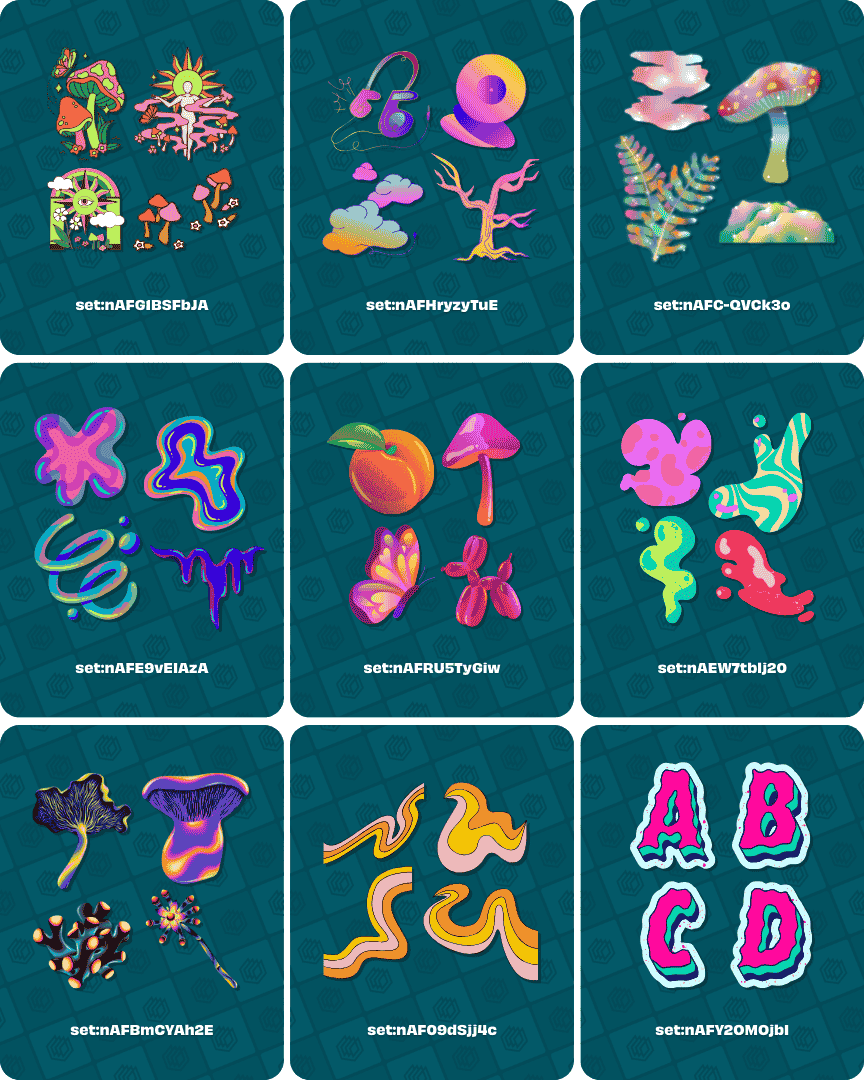
Canva Psychedelic Elements:
- set:nAFG1BSFbJA (Psychedelic illustrations)
- set:nAFHryzyTuE (Psychedelic cartoon illustrations)
- set:nAFC-QVCk3o (Dreamy psychedelic elements)
- set:nAFE9vEIAzA (Abstract psychedelic shapes)
- set:nAFRU5TyGiw (Surreal psychedelic elements)
- set:nAEW7tblj20 (Psychedelic blobs)
- set:nAFBmCYAh2E (Psychedelic mushrooms and plants)
- set:nAF09dSjj4c (Psychedelic rainbow shapes)
- set:nAGAt1l1WH8 (Psychedelic alphabet)
Canva Retro Element Codes
Below are some retro Canva element sets. We’ve included the element sets below and another 21 similar sets in our full Canva template – so make sure to get it (for free) by clicking here and filling in the form:

Canva Retro Elements:
- set:nAFsPTcDlCo (Retro takeaway characters and items)
- set:nAFEPSMyYfo (Retro items and products)
- set:nAF6SvBFtoQ (Retro letter elements)
- set:nAExRjQL1Ws (Vibrant lined retro elements)
- set:nAFOUxoXh0o (Retro backgrounds)
- set:nAFcH6TbDOE (Retro shapes and blobs)
- set:nAFK2o-iVwo (Retro illustrations)
- set:nAFHOPTp8nE (Pastel retro gaming items)
- set:nAGCpQBsIl8 (Retro gaming alphabet)
Canva Scrapbook Element Codes
Below are some scrapbook Canva element sets. We’ve included the element sets below and another 38 similar sets in our full Canva template – so make sure to get it (for free) by clicking here and filling in the form:

Canva Scrapbook Elements:
- set:nAGHqFMyvBo (Ransom note letters)
- set:nAEvYznIuVM (Scrapbook cutouts)
- set:nAGj_cj9eFg (Scrapbook scribbles)
- set:nAEwhoe5GTA (Textured scrapbook elements)
- set:nAF9_s2MCu8 (Scrapbook papercuts)
- set:nAE8RBAU1nI (Washi tape elements)
- set:nAFD7s-jVnA (Polaroid photo frames)
- set:nAF4FiZjnQI (Scrapbook letter cutouts)
- set:nAF9OQFeJg0 (Air mail postage stamps)
Canva Sports Element Codes
Below are some sports Canva element sets. We’ve included the element sets below and another 29 similar sets in our full Canva template – so make sure to get it (for free) by clicking here and filling in the form:
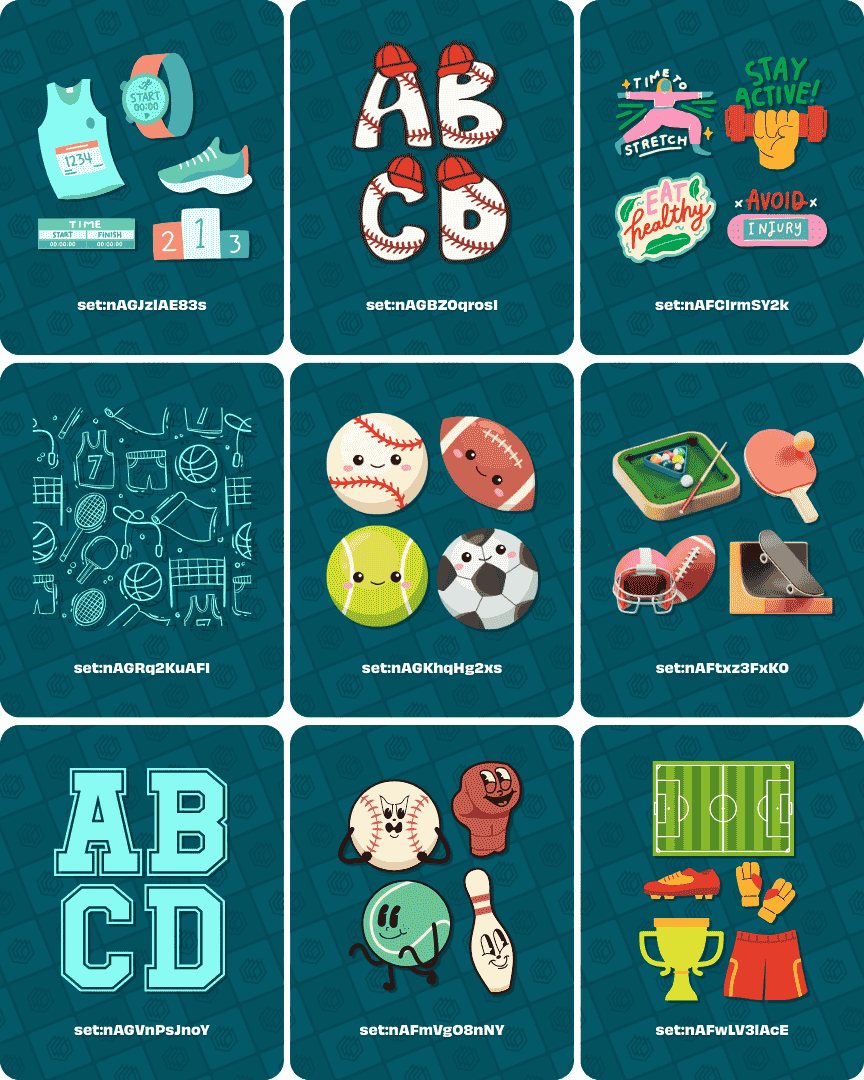
Canva Sports Elements:
- set:nAGJzlAE83s (Running gear and equipment)
- set:nAGBZ0qrosI (Baseball letters)
- set:nAFCIrmSY2k (Sport and fitness stickers)
- set:nAGRq2KuAFI (Sports backgrounds)
- set:nAGKhqHg2xs (Cute sports balls)
- set:nAGVnPsJnoY (College sports alphabet)
- set:nAFtxz3FxK0 (3D sports items)
- set:nAFmVgO8nNY (Anthropomorphic sports equipment)
- set:nAFwLV3lAcE (Football/soccer elements)
Canva Vintage Element Codes
Below are some vintage Canva element sets. We’ve included the element sets below and another 28 similar sets in our full Canva template – so make sure to get it (for free) by clicking here and filling in the form:

Canva Vintage Elements:
- set:nAFNegY_3-o (Vintage cutouts and elements of famous locations)
- set:nAF4C7rKpWE (Vintage scrap torn paper)
- set:nAF0InKgXLU (Vintage postage stamps)
- set:nAFk8M4ZI0w (Watercolour vintage elements)
- set:nAFAYI01how (Vintage watercolour landscape image cutouts)
- set:nAFu-UO100w (Gold vintage letters)
- set:nAFFKJCn7aQ (Illustrated vintage items)
- set:nAE9MEVtAnI (Vintage style elements)
- “vintage background” (Vintage backgrounds)
Canva Y2K Element Codes
Below are some Y2K Canva element sets. We’ve included the element sets below and another 33 similar sets in our full Canva template – so make sure to get it (for free) by clicking here and filling in the form:
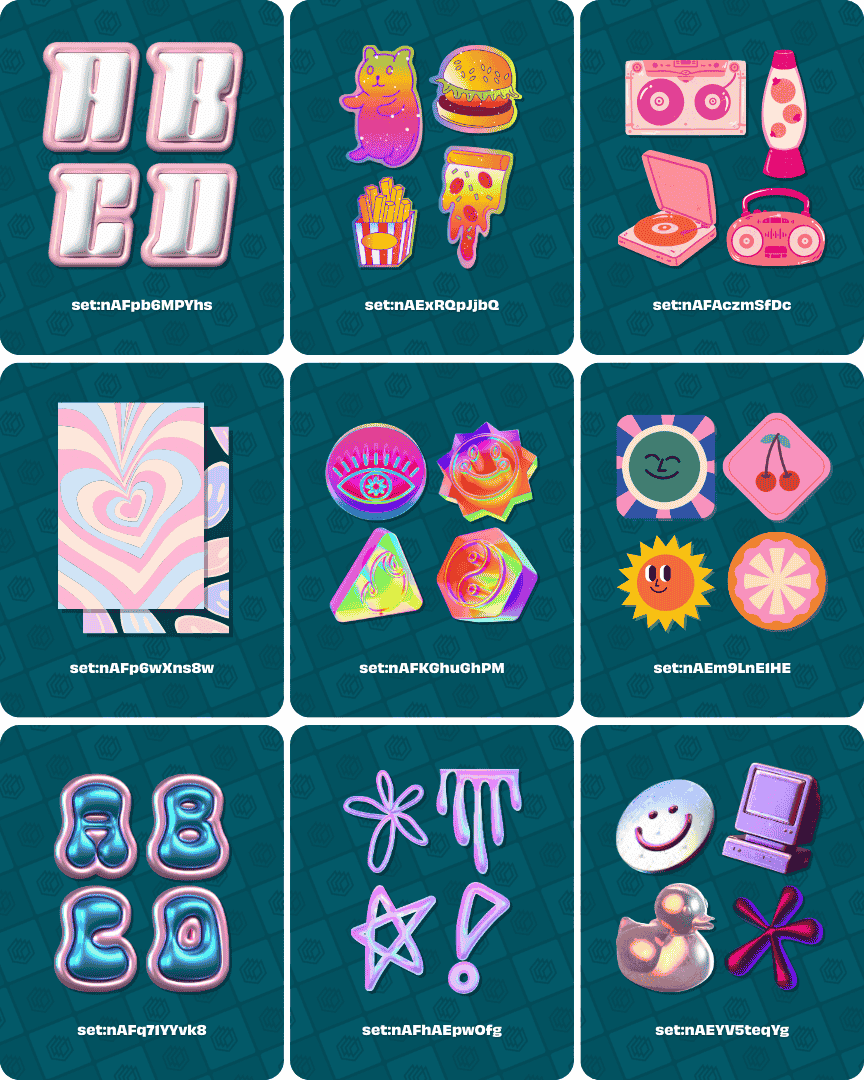
Canva Y2K Elements:
- set:nAFpb6MPYhs (3D Y2K alphabet)
- set:nAExRQpJjbQ (Y2K food stickers)
- set:nAFAczmSfDc (Textured Y2K items)
- set:nAFp6wXns8w (Y2K backgrounds)
- set:nAFp6wXns8w (3D holographic Y2K elements)
- set:nAEm9LnE1HE (Animated Y2K stickers)
- set:nAFq71YYvk8 (3D metallic bubble Y2K letters)
- set:nAFhAEpwOfg (Shiny Y2K shapes and elements)
- set:nAEYV5teqYg (Chrome and metal Y2K elements)
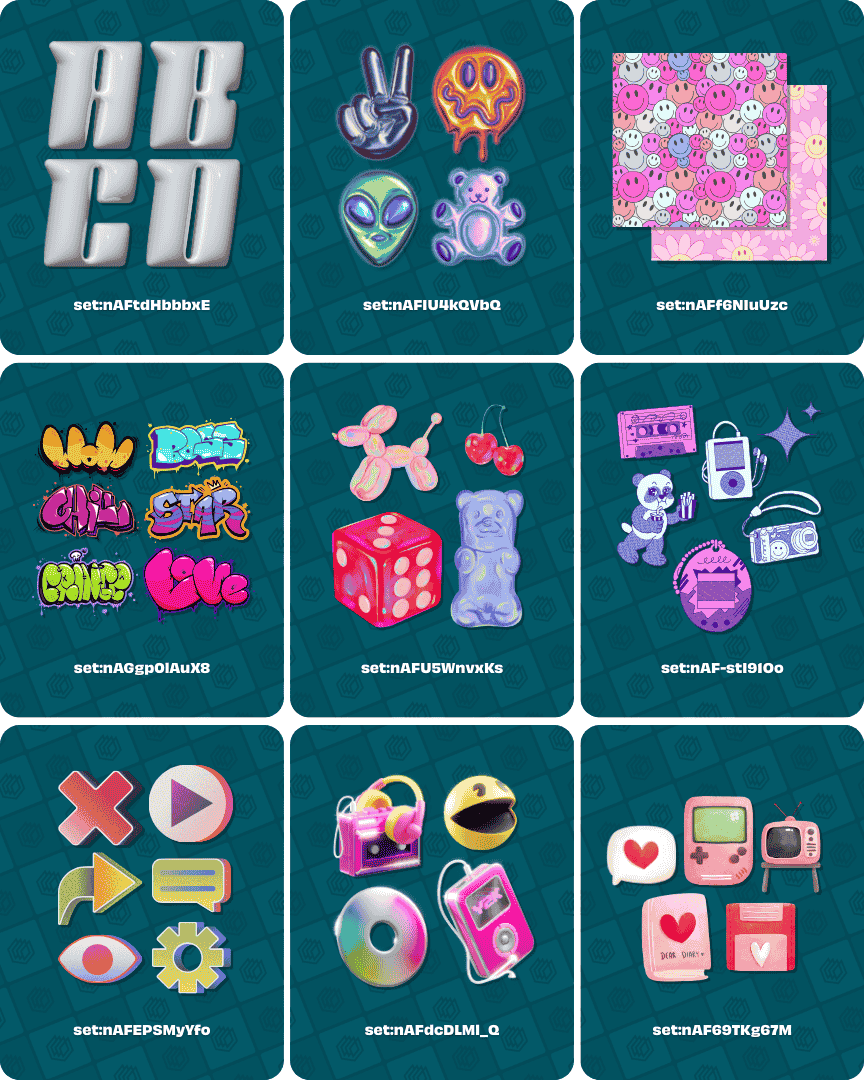
Canva Y2K Elements:
- set:nAFtdHbbbxE (3D Y2K style letters)
- set:nAFIU4kQVbQ (Gradient chrome Y2K elements)
- set:nAFf6NIuUzc (Y2K patterns)
- set:nAGgp0lAuX8 (Y2K graffiti typography)
- set:nAFU5WnvxKs (Dreamy holographic Y2K items)
- set:nAF-stI91Oo (Illustrated cartoon Y2K elements)
- set:nAFEPSMyYfo (Geometric Y2K icons)
- set:nAFdcDLMl_Q (3D Y2K illustrations)
- set:nAF69TKg67M (Cute hand-drawn Y2K elements)
Getting started with Canva elements
If you’re looking to create a consistent a recognisable brand then choosing the right graphics (and creating consistency with them) is incredibly important.
Not only is this vital for having a distinct and consistent look for your brand that will help with recognition, but it’s also important for showing your personality, helping you convey your message effectively, and capturing the feeling you’re trying to portray with your content and brand as a whole.
So how do you create consistency?
- Consistent colour palette
- Subject matter relevancy
- Element and graphic style
The real magic happens when you combine all three together.
Note: Combining elements with the perfect fonts is also key for good looking designs. Be sure to check out our Canva font combinations guide for help finding your ideal fonts.
Consistent colour palette
You’ll want to make sure to choose your brand colours before searching for and selecting elements and graphics for your design assets.
Canva has put together a straightforward guide that goes through the process of choosing the right colours for your brand. It’s worth checking out.
Once you have your colours selected, it allows you to choose elements that match up well and reflect the brand personality you’re going for.
For example, a beauty brand might have soft pastel colour palette, and choose graphics (and graphic colours) that reflect the clean, positive and bright look they’re going for:

Subject matter relevancy
This one is simple as well. Choose elements that fit with your niche or industry to ensure you’re instantly understood and recognised (to attract the right kind of audience), and to represent the feelings and messages that you want to convey.
I’ll stick with the beauty example, for an imaginary brand that wants to convey a modern, fun and approachable look:

Element and graphic style
The element style should also reflect your brand. For example, you might want to appear more refined and elegant or possibly you’re after a more fun and easy going look and feel.
Graphic element styles can help portray this for your brand (sticking with the beauty theme):

How to find the right Canva elements for your designs (and brand)
There are plenty of ways to quickly find the right elements for your brand and Canva designs. Here are some actionable tips for finding the perfect Canva elements:
Be specific and targeted in your element searches
Don’t just type in the word for the subject or area you’re looking for graphics in, otherwise you’ll get far too many elements in the search results.
The best approach is to refine your search, and there are a few ways to do this:
Add more keywords + additional parameters
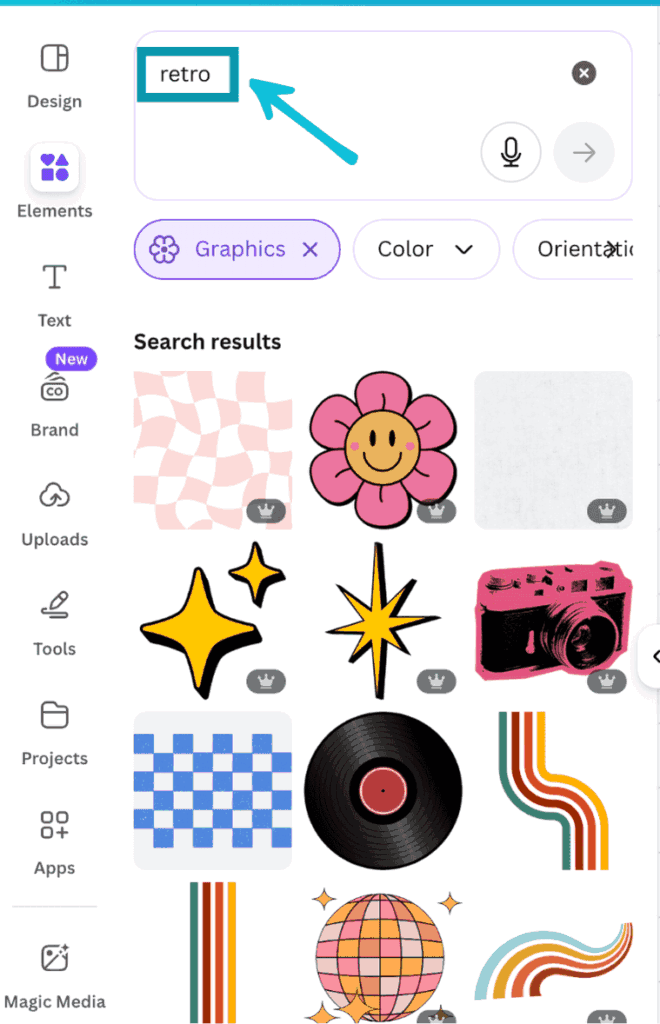
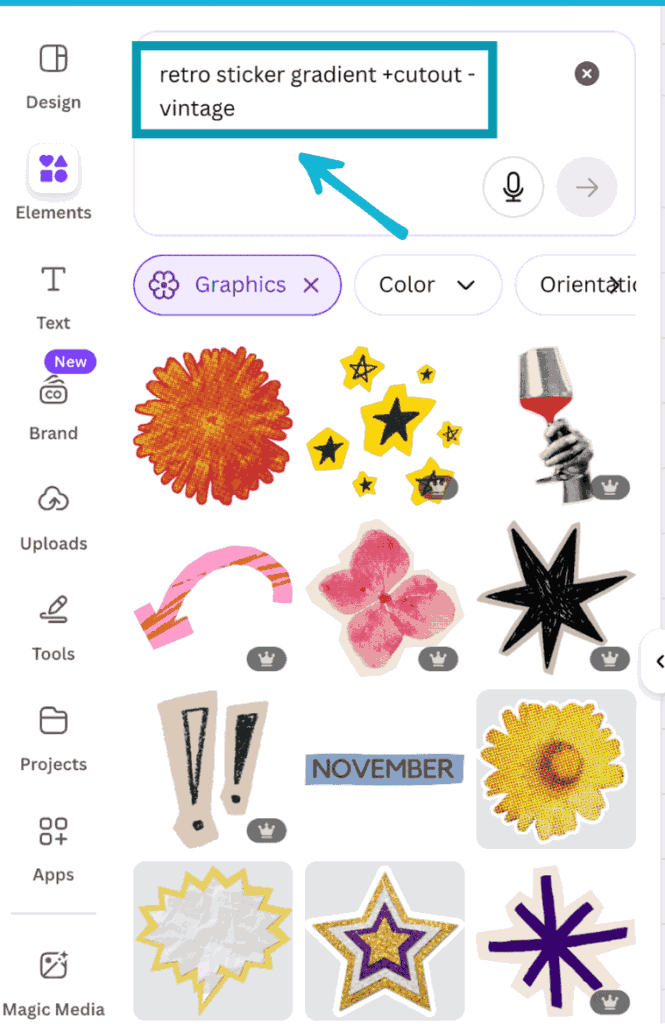
Rather than simply searching with an overarching term for example “Retro” you can get more specific such as “Retro sticker gradient”, you can also add ‘+’ or ‘-‘ parameters.
When you add a keyword with a ‘+’ before it, you ensure that any elements in the search results will contain that word in their filename or keyword labels.
Conversely, if add a keyword with a ‘-‘ before it you’ll remove any elements that contain that keyword in their filename or labels.
You can see below the difference in the search results for “Retro” vs “Retro sticker gradient +cutout -vintage”. It really narrows down your search results:
Use search filters
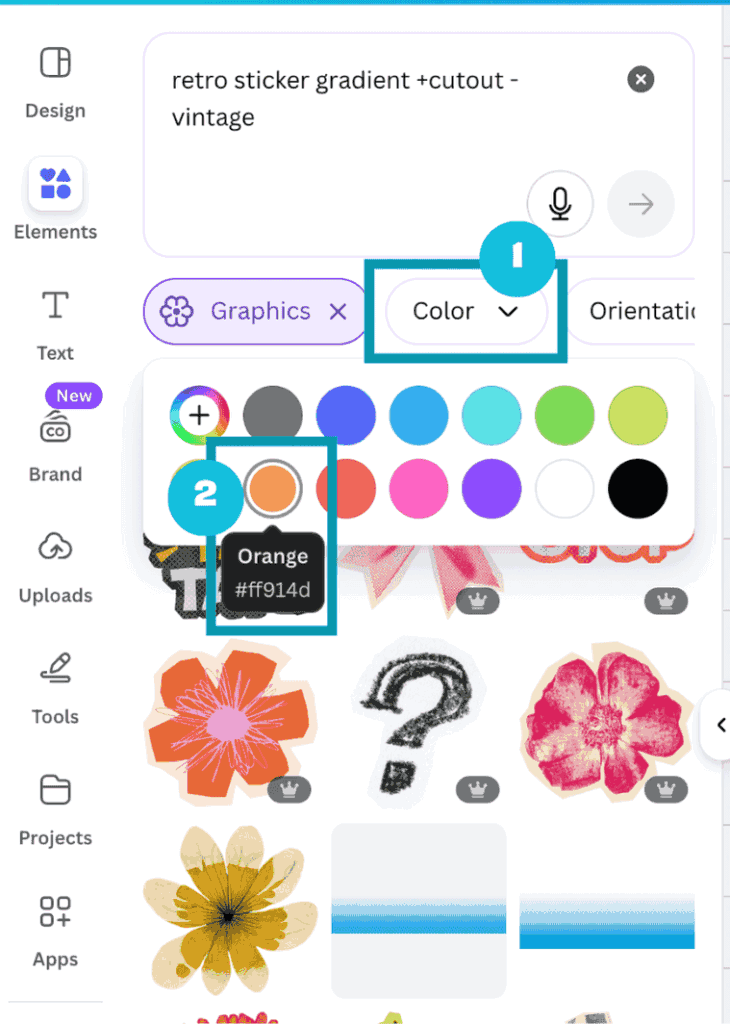
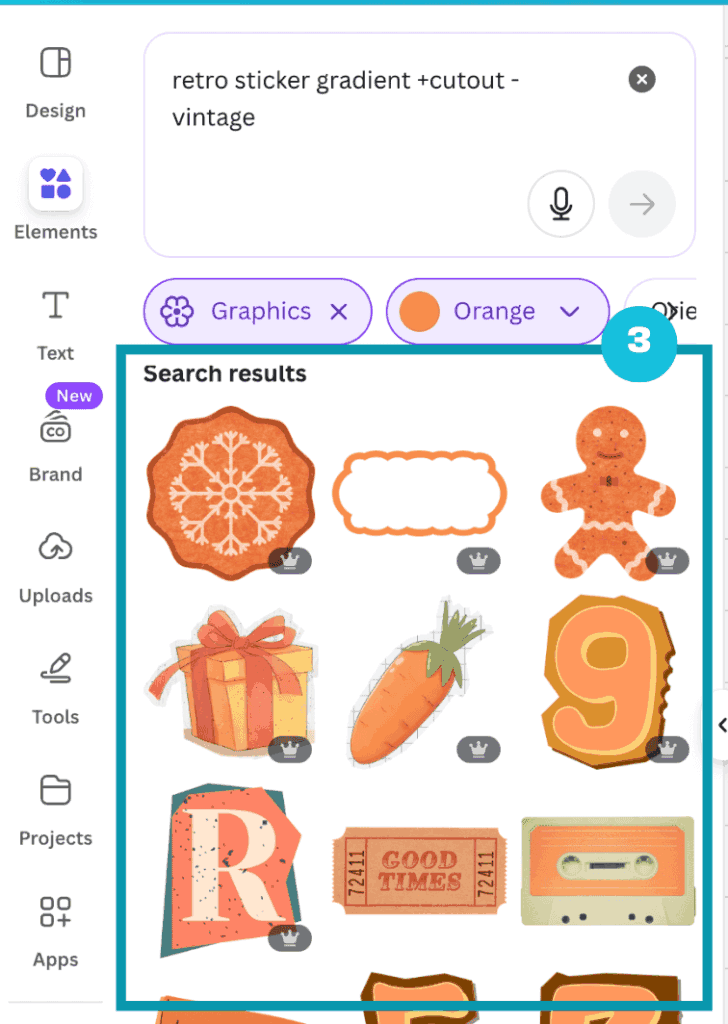
To narrow things down even further you can utilise the search filters that Canva offers. A great option, particularly if you have specific brand colours that you want to match things up with, is to filter the results to show elements that contain your selected colour.
You can do this by clicking on the ‘Color’ filter under the search bar (1), and either selecting one of the colour presets or inputting a specific colour hex code (2). You’ll then see only elements that contain your chosen colour (3):
You can also filter the results by price (i.e. Free or Pro elements), orientation (vertical, landscape, etc.), and to show static or animated elements.
Discover more keywords
You can go to our Canva element keywords guide (coming soon) to find keyword suggestions for a range of niches.
Within Canva you can also discover more keywords by clicking on the three dots when hovering over an element, and you see what keyword labels that item has.
This will give you further inspiration on what to search for to find your ideal elements:

See more from specific designers
If you like the design style of a specific Canva designer, you can search through the design elements exclusively created by them.
You might come across a Canva element that really fits with the style you’re looking for. You can click on the three dots that appear when you hover your cursor over an element (1), then click on the ‘View more by “designer” option (2):
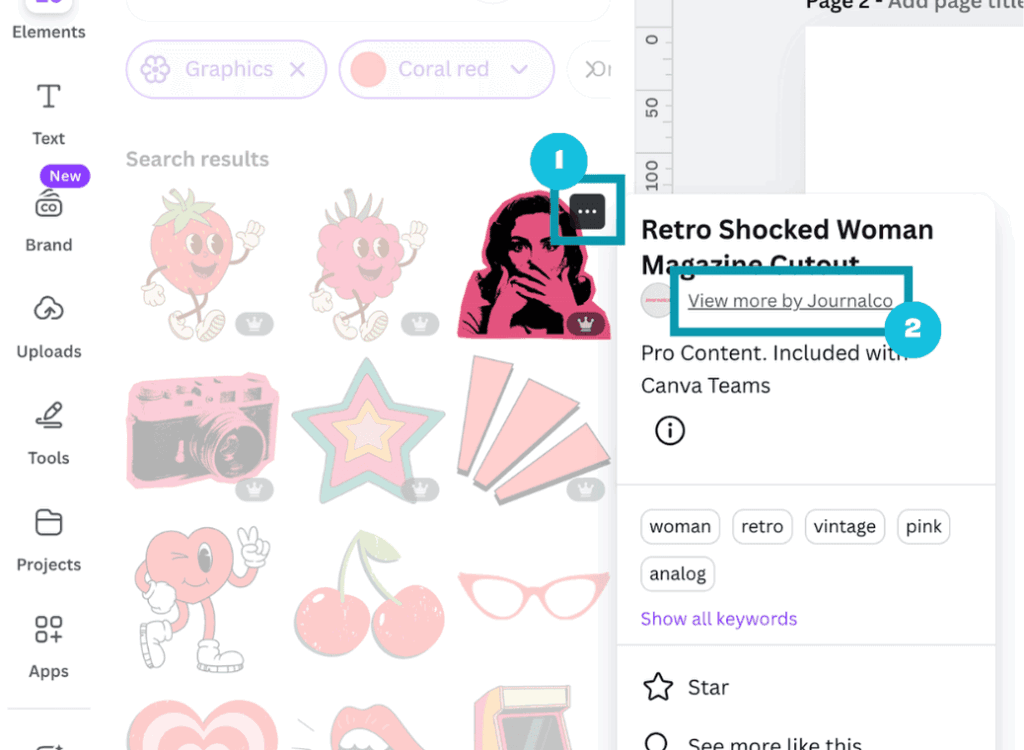
From here you can search for more elements within that designers library:
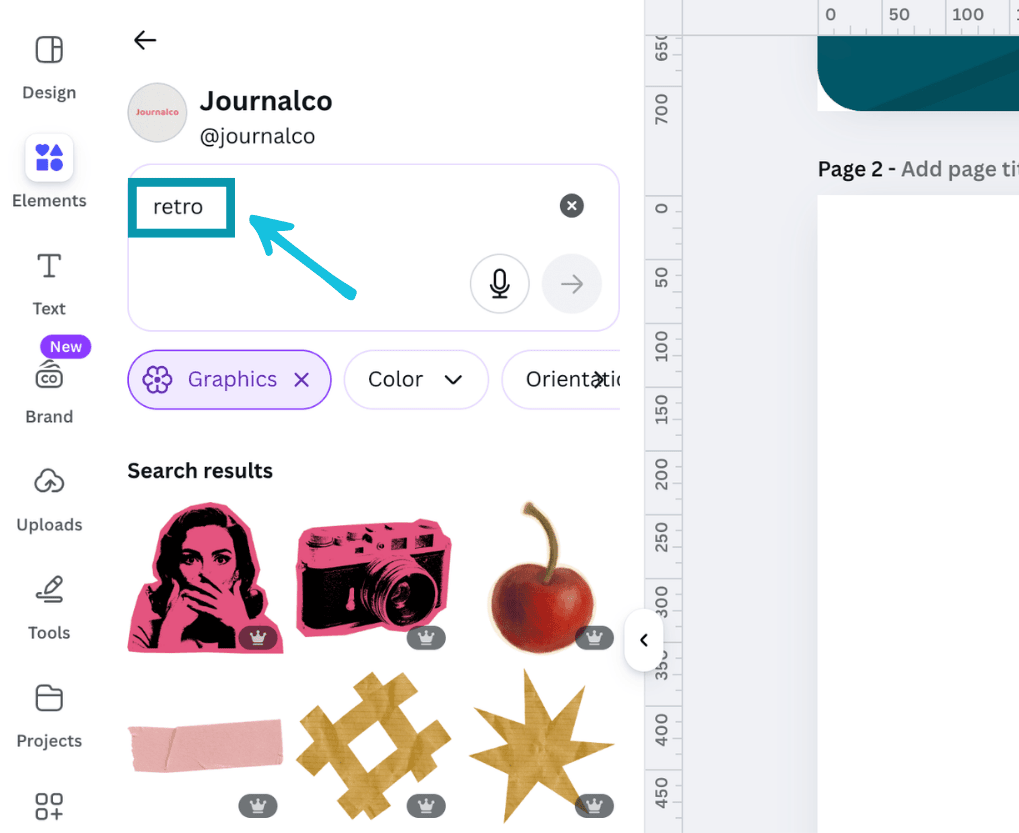
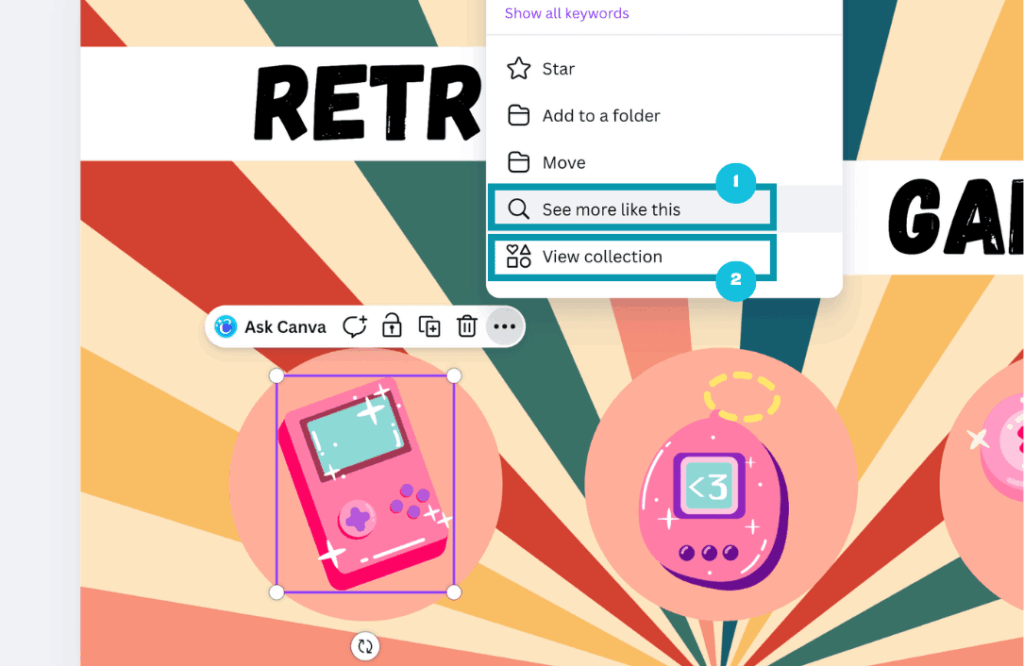
Use the ‘see more like this’ option
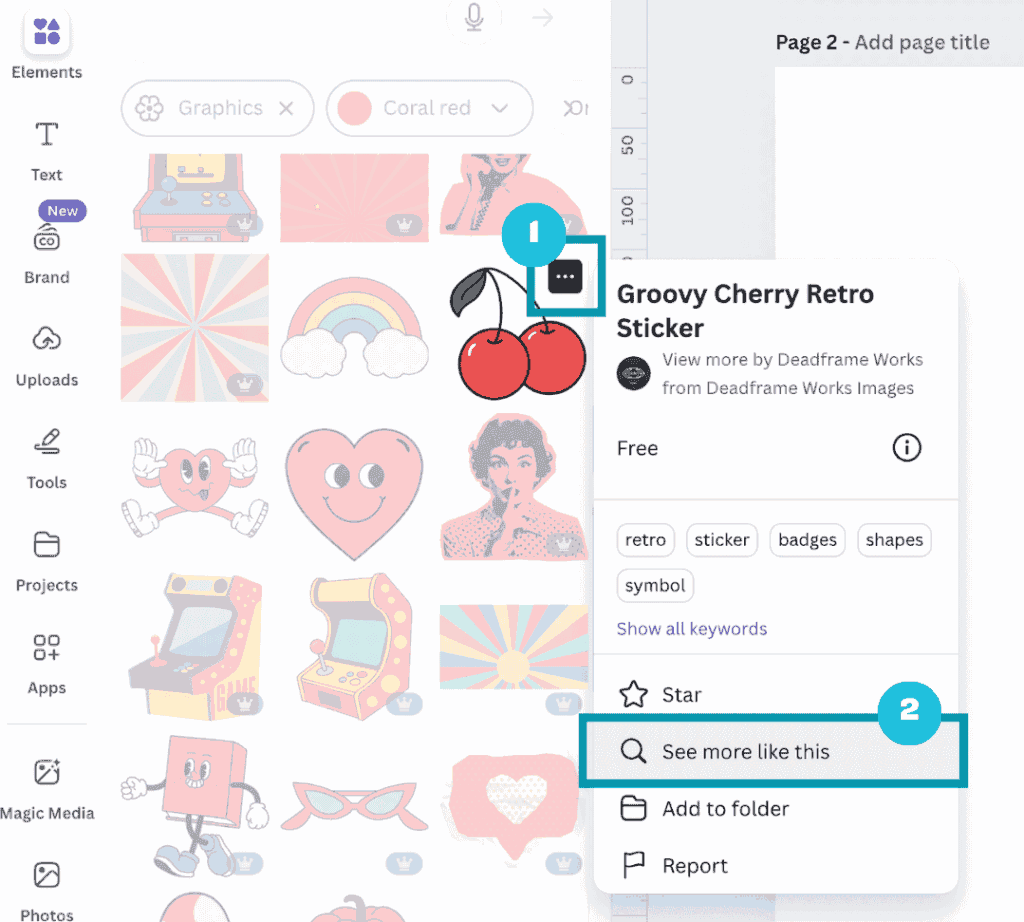
If you like the look of a particular element but you’d like to see similar ones but in different styles, you can view more elements in a similar style by clicking on the three dots over an element (1), and selecting the ‘see more like this option’ (2):
View collections
A great way to find elements that are in the exact same style so you can keep consistency in your brand designs is to view collections.
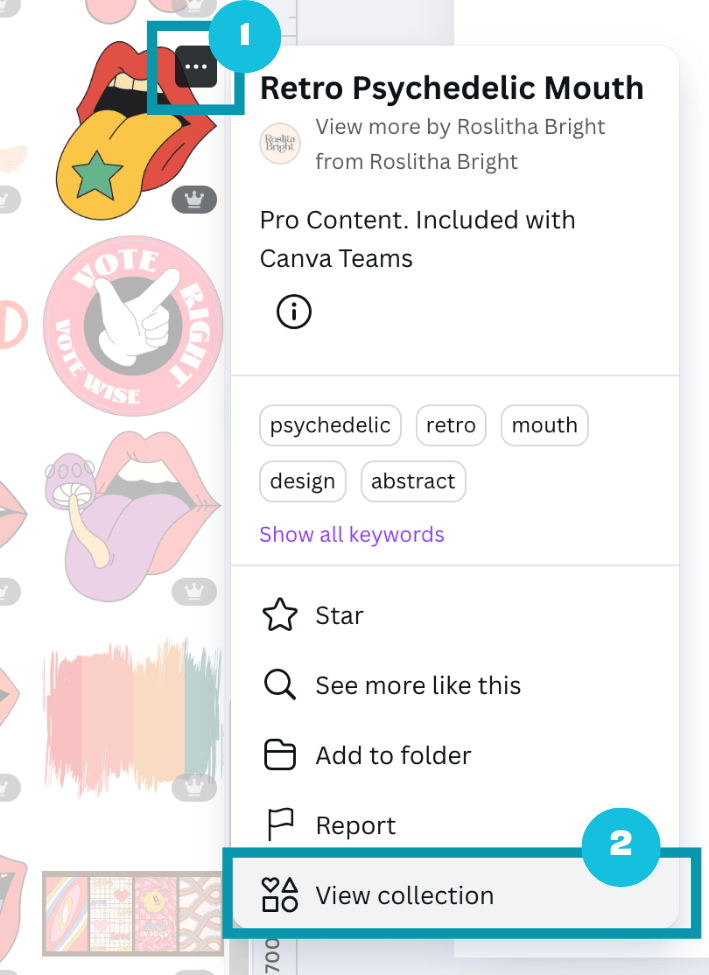
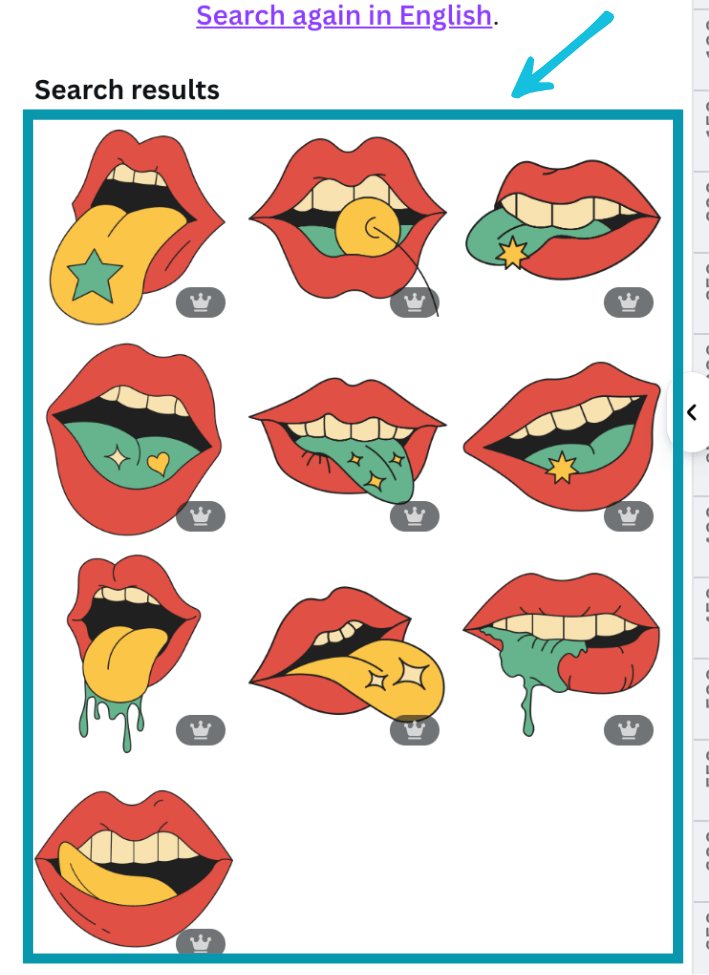
When you find an element you like, click on the three dots (1), go down the popup list and select ‘View collection’ (2) and this will up a set of elements in a consistent style (Note: not every design element is part of a collection so you won’t see this option for all graphics):
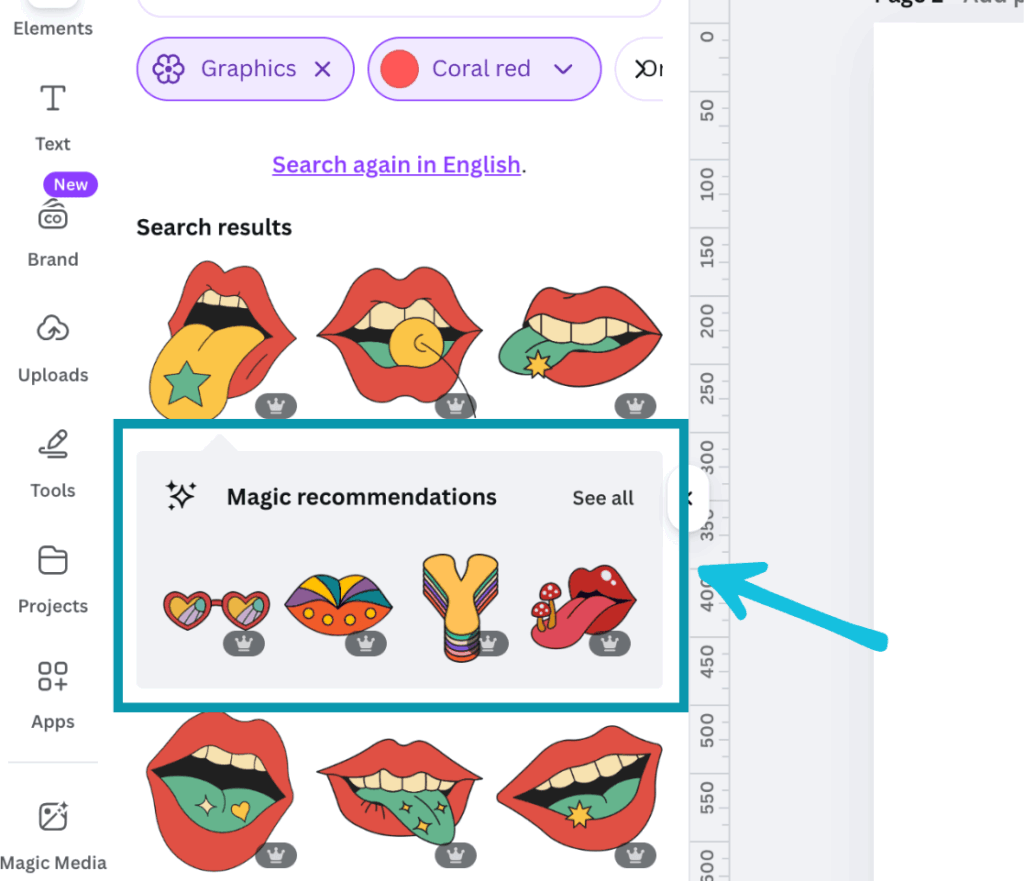
View Canva’s magic recommendations
When you add an element to your design canvas – Canva will sometimes suggest some ‘magic recommendations.
They won’t all be part of the collection (and it’s sometimes hit or miss) but it’s a great way to find new elements that are similar to the one of you’ve chosen:
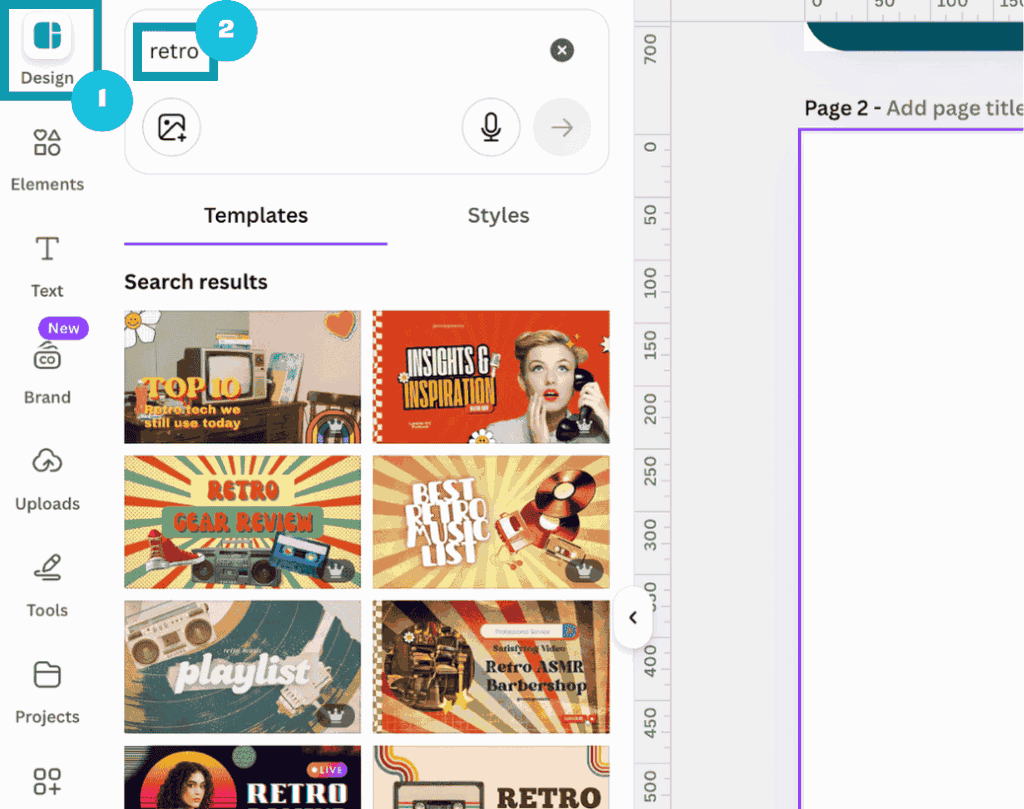
Use templates for inspiration
You can see what elements are being used in existing Canva templates to either use them in your designs or for inspiration.
To do this, got to the design tab in the editor (1), input a relevant search term (2) and find some templates that you like the look of.
Add the template to your design canvas, select an element you like the look of from that template, click on the three dots (1) and click on ‘Info’ (2) in the popup that appears:

You can click on ‘see more like this’ (1) or ‘view collection’ (2) if that option is there.
You’ll get suggestions in a similar style or format, or additionally consistent styled elements from the same collection:
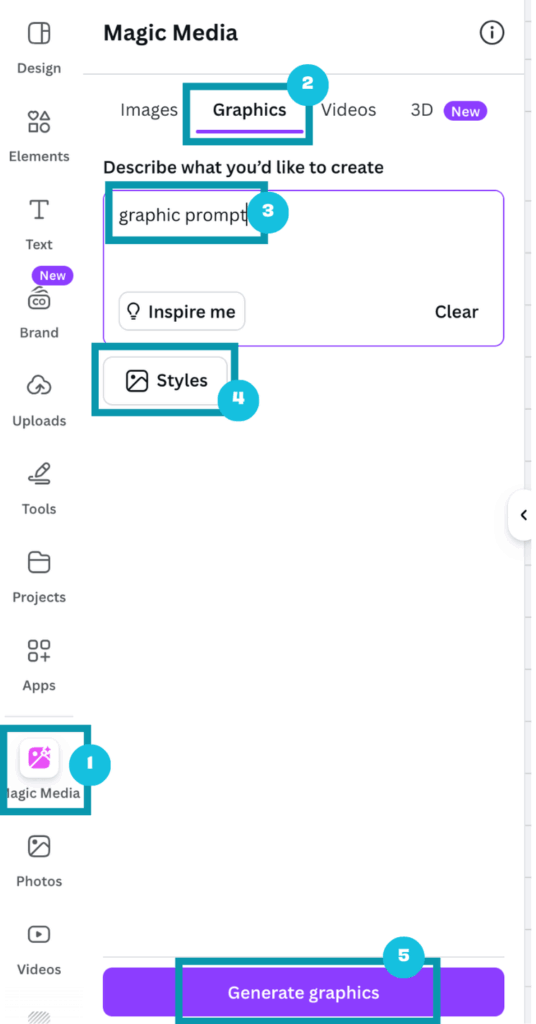
Create your own elements using Canva AI
You can generate graphics (and images) with Canva AI.
It’s quite useful, but not perfect at the moment. However, you can generate some elements that you might not be able to source when searching through the existing elements library.
It’s also worth noting that you’ll have to be quite specific in your prompt to get the image (graphic) that you’re after.
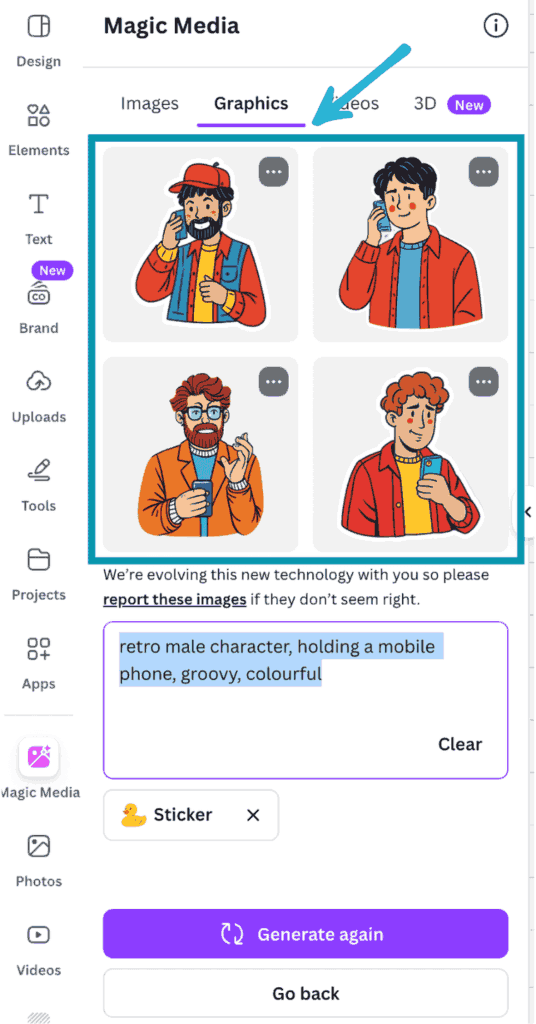
To do this, simply go to the ‘Magic Media’ tab (1), click on the ‘Graphics’ option (2), input your prompt in the description box (3), choose your preferred style (4) and , and click ‘Generate graphics’ (5).
Canva will create four graphic variations for you then you can choose from to add to your design canvas.
As an example, I put in this prompt “retro male character, holding a mobile phone, groovy, colourful”, chose sticker style and got these results:
Note: You can also go to Canva AI from your dashboard homepage and create images from there.
Find and follow specific designers
From your Canva dashboard homepage, go to the ‘Templates’ tab, select ‘Graphics’, and from here you can search for specific elements that you’re after.
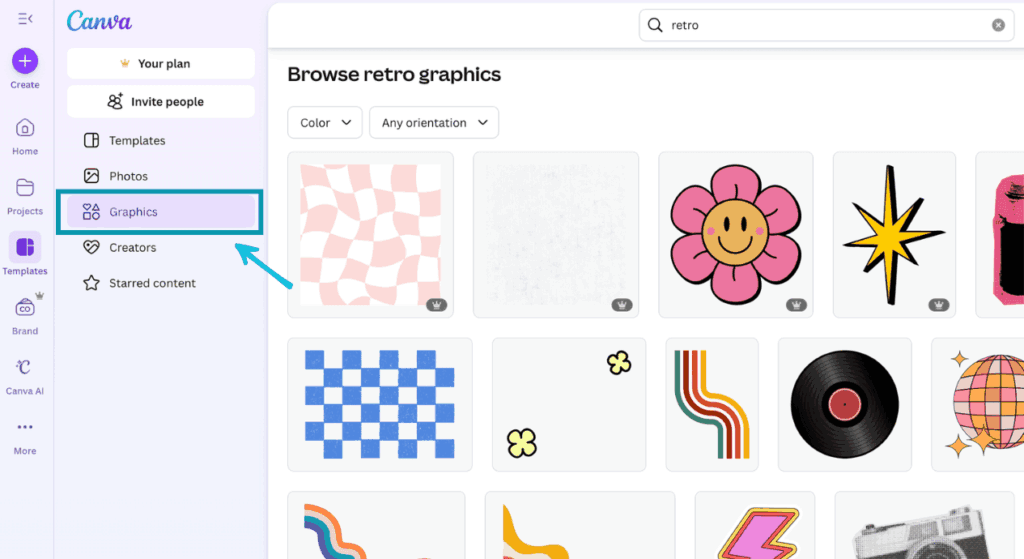
Once the element results have loaded, you can find some elements you like, click on them, and then in the popup you can go to the creators profile link.
From here you can search through all the elements (and more) they’ve produced and if you like their style you can follow them and go back to their profile periodically to see what other things they’ve added.
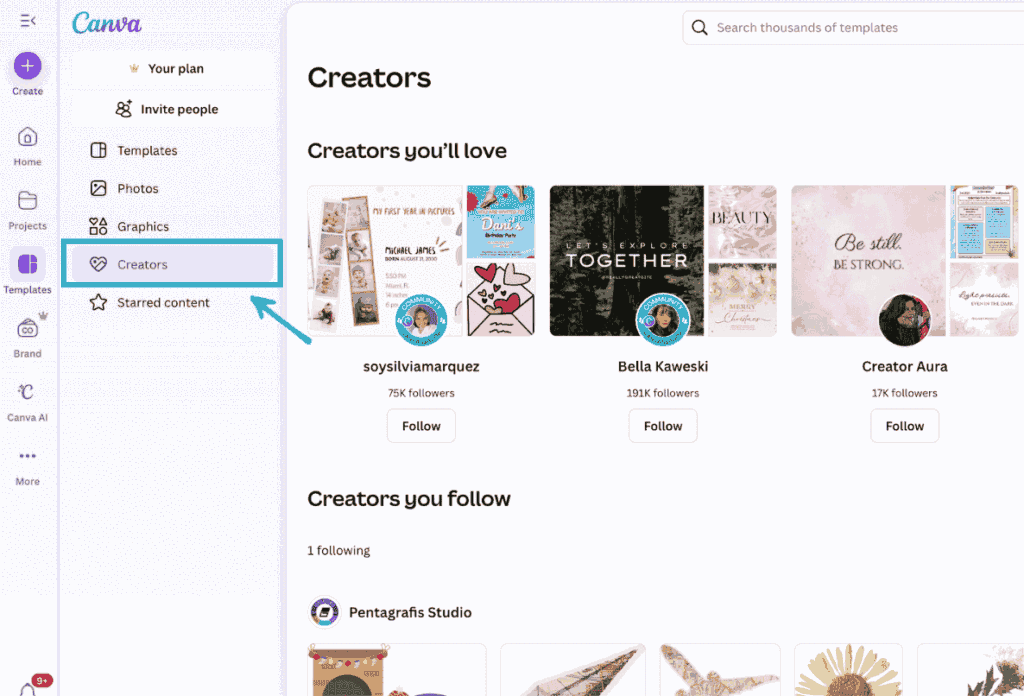
To see the creators you’re following, go to the ‘Creators’ tab under ‘Templates’ from your dashboard homepage.
Browse Pinterest
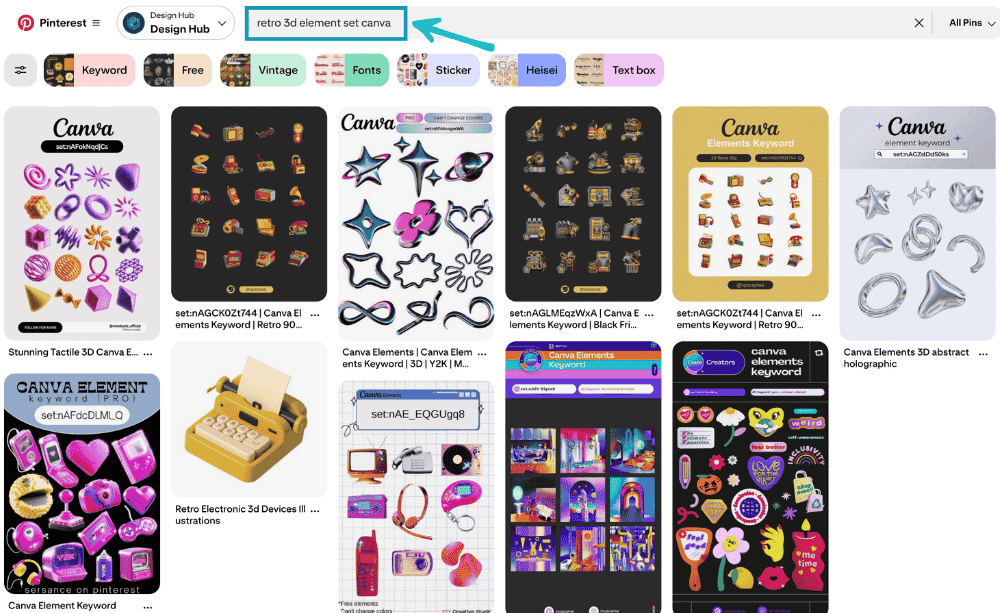
A great place to search for Canva collections or sets is on Pinterest. It’s a great fantastic resource for finding element sets that have already been curated.
You can be specific in your search e.g. “retro 3d element set canva” and there’s a good chance that you can find a set that someone has already curated on Pinterest.
You can then copy their suggested keyword search term or element set code and put it into Canva:
Bonus tip: Save elements for later!
One last tip is to save the elements you love (and will likely reuse) so you can easily access them again.
This can done in a couple of ways:
- Save them to a folder
- Add them to your brand kit (Pro feature)
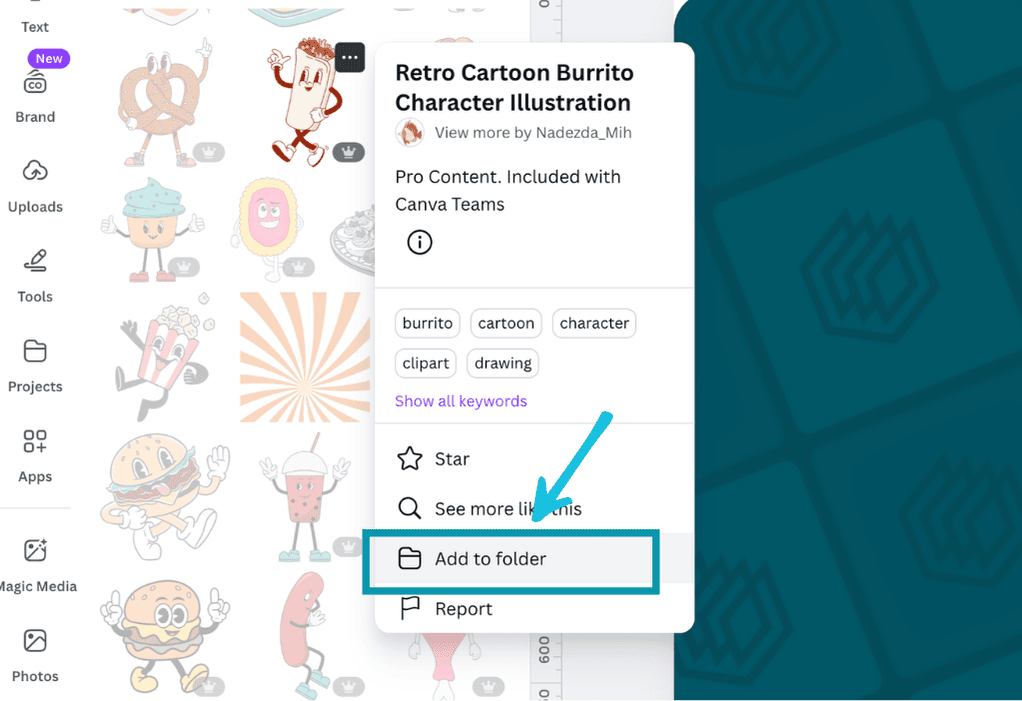
To save them to a folder:
Go to an element that you want to save in the editor area, click on the three dots and click ‘add to folder’. From here you can either add them to an existing brand assets folder if you have one, or you can create a new folder to save all your favourite elements too.
To add it to your brand kit:
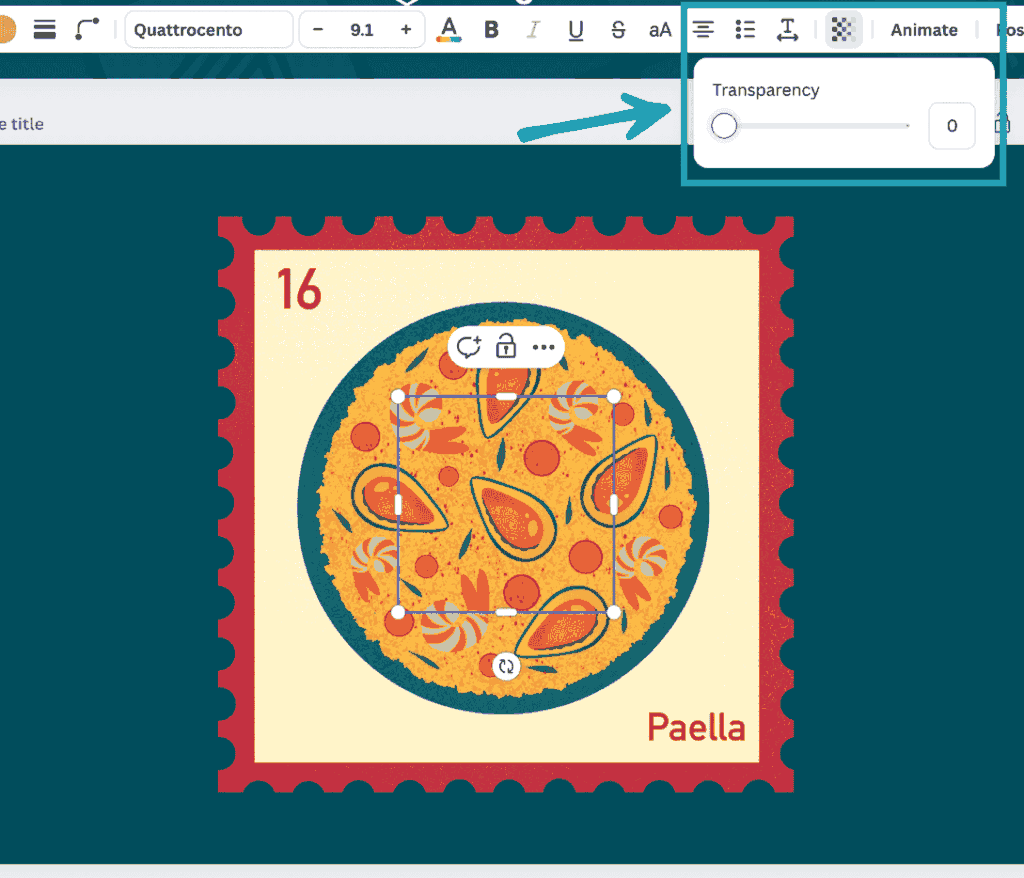
This is a bit of a weird hack, but if you really want to add elements to your brand kit, you’ll need to combine them with an invisible shape.
So, for example in the image below you can I’ve added an element to a blank page, and then added a rectangle over it (and made the rectangle fully transparent) so it’s within the area of the element that I want to download:
I’ve then dragged my cursor and selected both the element and the shape at the same time, clicked on the three dots, and chose ‘download selection’ (you need at least two elements to get the download selection option’:
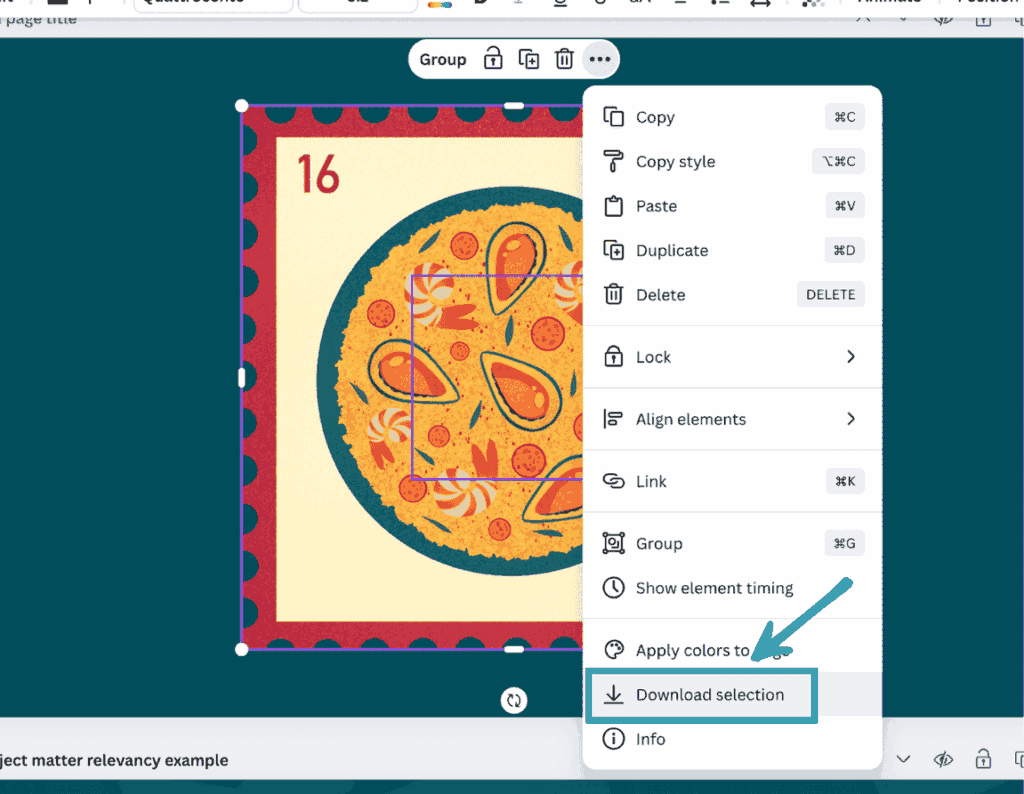
Notes:
- If you’re downloading an image element (where you can change the colours) download it as a PNG
- If you’re downloading a graphic that let’s you change the colours, download it as an SVG file.
- Choose transparent background when downloading – for both options
Once you follow those steps you can go to your dashboard, navigate to your brand kit area (1), go to the ‘Graphics’ tab, and then upload the element or elements that you want to be easily accessible from your brand kit to the ‘graphics’ area of the brand kit (3):

These elements will now be accessible from your brand kit whenever you want to use them, and any collaborators who have access to your brand kit can access them too!
Grab our Canva element sets template for free
If you want access to a a curated resource of over 600 Canva element sets then grab our completely free template by putting in your email address in the form below.
The file contains several Canva templates with element sets in a variety of niches including aesthetic, cute & fun, Christmas, vintage, and so much more:
Make sure to check your junk/spam inbox in case it gets sent to there.
Final thoughts
Once again, if you want to quickly access all 600+ of the curated Canva font element collections in our free template, fill in the form above and you’ll get instant access to all the element sets and codes within your Canva account.
We hope this article helps and inspires you.
Enjoy creating! If you have any questions or suggestions leave a comment below.